Safety isn’t a luxury in industrial environments—it’s a legal and moral obligation. One of the most critical systems protecting workers during equipment maintenance is the Lockout Tagout (LOTO) program. At the heart of this system are lockout tagout devices, the physical tools that ensure machines stay de-energized. But knowing which devices to use, how to apply them, and where to document procedures often starts with a reliable lockout tagout devices PDF. These resources combine visual guides, checklists, compliance standards, and device specifications into one actionable document.
For safety managers, maintenance teams, and compliance officers, a well-structured LOTO PDF isn’t just a reference—it’s a blueprint for preventing accidents, meeting OSHA standards, and creating a culture of accountability.
What Are Lockout Tagout Devices?
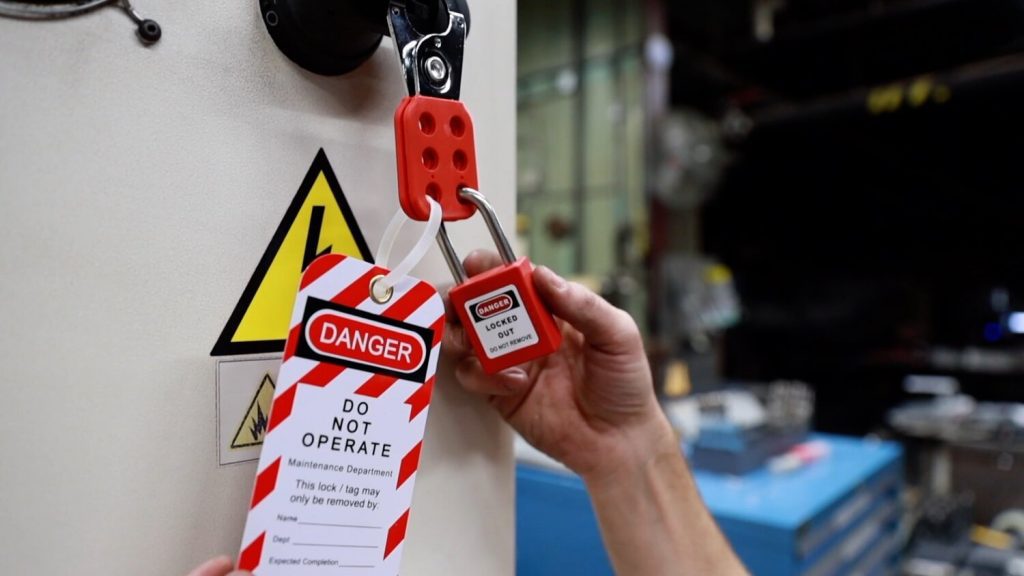
Lockout tagout devices are physical tools used to isolate energy sources from machinery during service or maintenance. They prevent accidental startup, protecting workers from electrocution, crushing, or other life-threatening injuries.
These devices fall into two functional categories:
- Lockout devices – Mechanisms that physically block energy isolation (e.g., padlocks, valve locks, circuit breaker locks).
- Tagout devices – Warning labels or tags that communicate that equipment is unsafe to operate. Tags must include the worker’s name, date, reason for lockout, and contact information.
OSHA standard 29 CFR 1910.147 mandates the use of these devices across general industry whenever servicing machines that could release hazardous energy.
A lockout tagout devices PDF typically includes diagrams, part numbers, installation steps, and compatibility guidance for each device type, making it invaluable for training and deployment.
Common Types of Lockout Devices in Practice
Every machine presents unique energy control challenges. A comprehensive LOTO PDF outlines device types tailored to specific equipment. Here are the most widely used:
- Valve Lockouts – Used to secure gate, ball, and butterfly valves on pneumatic, hydraulic, or steam systems. They prevent accidental reopening.
- Cable Lockouts – Flexible steel cables with locking mechanisms, ideal for isolating multiple energy sources or irregular shapes.
- Circuit Breaker Locks – Housings that lock breakers in the “off” position, preventing re-energization of electrical panels.
- Plug Lockouts – Fit over electrical plugs to stop them from being reinserted into outlets.
- Group Lockout Stations – Multi-lock hasps that allow several workers to apply individual locks to a single isolation point.
Without a detailed PDF reference, teams may misapply devices—like using a tag without a lock (a violation of OSHA’s hierarchy of controls). A good PDF emphasizes that tags are secondary; physical lockout is primary.
Why a Lockout Tagout Devices PDF Is Essential
A PDF isn’t just a digital handout. When properly designed, it becomes a living document that supports training, audits, and day-to-day safety workflows.
Streamlines Training and Onboarding
New technicians need visual, step-by-step guidance. A lockout tagout devices PDF can include annotated diagrams showing how to install a lock on a conveyor motor or secure a hydraulic line. This reduces reliance on verbal instructions, which are prone to misinterpretation.
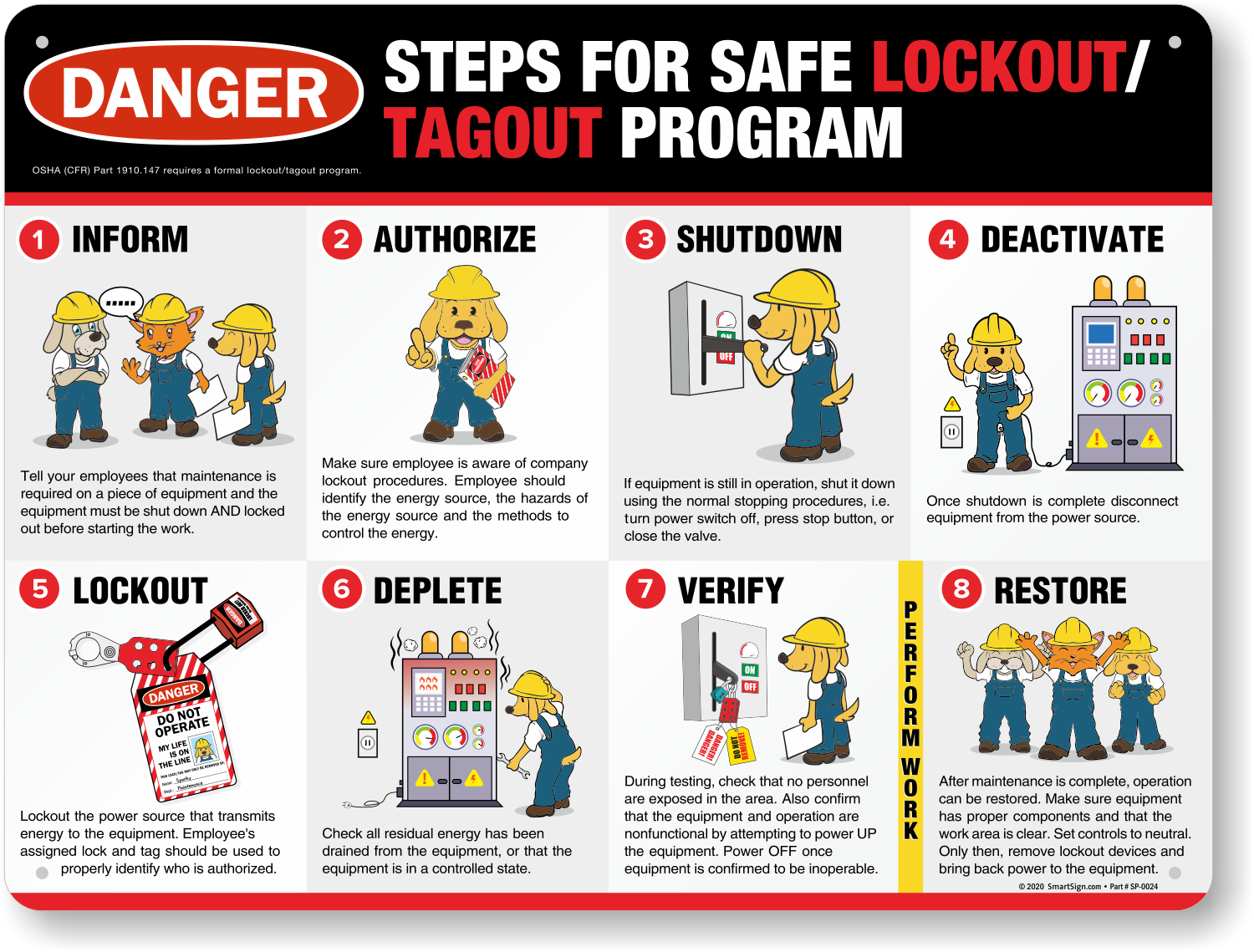
- For example, a PDF might illustrate the five steps of a LOTO procedure:
- Notify affected employees.
- Shut down the machine.
- Isolate energy sources.
- Apply lockout devices.
- Verify de-energization.

Each step can include device recommendations, common pitfalls (e.g., skipping verification), and PPE reminders.
Supports OSHA Compliance
OSHA doesn’t require a PDF, but it does require documented procedures. A well-structured LOTO PDF serves as a central repository for: - Equipment-specific energy control procedures - Approved device lists - Lockout flowcharts - Audit logs and inspection schedules
During an OSHA inspection, having a current, accessible PDF can mean the difference between a citation and a clean review.
Reduces Human Error in High-Risk Environments
Fatigue, haste, and complacency lead to mistakes. A PDF checklist embedded in a LOTO program reminds workers to: - Use only assigned personal locks - Test circuits after lockout - Remove locks only after confirming safe conditions
In one real-world case, a manufacturing plant reduced LOTO-related near-misses by 68% after introducing a standardized PDF guide with visual checklists at each machine station.
Key Components of an Effective LOTO PDF
Not all PDFs are created equal. A high-impact lockout tagout devices PDF includes these elements:
Device Catalog
with Specifications
A table listing each lockout device, its compatible equipment, material specs, and installation steps ensures consistency. For example:
| Device Type | Compatible With | Max Temp | Material |
|---|---|---|---|
| Circuit Breaker Lock | 15–200A Breakers | 250°F | Nylon Polymer |
| Ball Valve Lock | 0.5–2" Valves | 180°F | Polypropylene |
| Electrical Plug Lock | NEMA 5-15 Plugs | 200°F | Reinforced PVC |
This allows maintenance teams to quickly identify the right tool without guesswork.
Energy Source Mapping
A strong LOTO PDF includes diagrams mapping all energy sources for a given machine—electrical, pneumatic, hydraulic, thermal, and gravitational. Each source is paired with the recommended lockout method.
For instance, a press machine might have: - Electrical disconnect → Circuit breaker lock - Hydraulic lines → Valve lock with bleed valve access - Flywheel → Mechanical lock bar
Missing one source invalidates the entire lockout. A PDF makes it harder to overlook.
Standard Operating Procedures (SOPs)
Equipment-specific SOPs prevent one-size-fits-all mistakes. The PDF should include fillable templates where teams can document: - Machine ID - Energy types involved - Authorized personnel - Device used - Date and time of lockout
These become part of the facility’s compliance record.
Top 5 Lockout Tagout Device Providers with PDF Resources When selecting LOTO devices, choose suppliers that offer detailed PDF guides. These companies combine hardware with comprehensive documentation:
- Grace Technologies
- Offers full LOTO PDF kits with color-coded device guides, hazard assessment templates, and training modules. Their “Energy Control Program Kit” is widely used in heavy manufacturing.
- Spartan Safety Company
- Provides downloadable PDFs for each product line, including installation videos linked via QR codes. Their cable lockout guides show tension specs and bend radius limits.
- RS Components
- Hosts a digital LOTO hub with multilingual PDFs, compliance checklists, and 3D schematics. Ideal for multinational operations.
- Seton Safety
- Features customizable PDF templates for LOTO procedures, compatible with OSHA and ANSI standards. Users can brand them with company logos and contact info.
- Master Lock
- Known for their LOTO station PDFs that include layout designs, device inventory sheets, and audit checklists. Their padlock color-coding system is clearly explained in supporting documents.
These providers don’t just sell locks—they deliver knowledge. Always verify that their PDFs are updated to reflect current OSHA interpretations and industry best practices.

Real-World Challenges and How PDFs Help Solve Them
Even with good intentions, LOTO programs fail due to real-world friction. A well-designed PDF addresses these issues head-on.
Problem: Inconsistent Device Application Scenario: Two technicians service the same CNC machine. One uses a universal valve lock; the other improvises with a zip tie. Solution: A PDF with approved device lists and “do not use” warnings eliminates improvisation. Include photos of correct vs. incorrect applications.
Problem: Temporary Reprieves from Lockout Scenario: A supervisor asks a worker to briefly re-energize a saw to test alignment. Solution: The PDF should outline a formal “temporary removal” procedure requiring management sign-off, re-verification, and team notification. This prevents complacency.
Problem: Lost or Damaged Locks Scenario: A worker’s lock is damaged, and they borrow a coworker’s. Solution: The PDF should enforce personal lock policies and include a lost-lock reporting form. It should also specify lock durability standards (e.g., corrosion-resistant, 250-lb shackle strength).
How to Create or Customize Your Own LOTO PDF
Off-the-shelf PDFs help, but every facility has unique equipment. Customize your document in four steps:
- Audit All Machinery
- Walk through each workstation. Document energy types, isolation points, and existing controls.
- Map Devices to Machines
- Assign specific lockout devices to each energy source. Include part numbers and photos.
- Integrate with Existing Safety Programs
- Link the PDF to your permit-to-work system, maintenance logs, and training records.
- Review and Update Quarterly
- Assign ownership to a safety officer. Update the PDF when new equipment arrives or procedures change.
Use tools like Adobe Acrobat Pro or Canva to make the PDF interactive—embed links to video tutorials or add digital signature fields for lockout logs.
Final Recommendations for Using LOTO PDFs Effectively
A lockout tagout devices PDF is more than a document—it’s a safety enabler. To get the most from it: - Store it digitally on tablets or kiosks near high-risk equipment. - Print laminated versions for areas without internet access. - Include it in new hire orientation and annual refresher training. - Require supervisors to review it before authorizing maintenance work.
The best LOTO programs don’t rely on memory. They rely on accessible, accurate, and actionable documentation.
Create your lockout tagout devices PDF today—not after an incident, but before one ever occurs. Equip your team with clarity, consistency, and confidence.
Frequently Asked Questions
What is a lockout tagout devices PDF used for? It serves as a reference guide for selecting, applying, and documenting the use of lockout devices during equipment maintenance.
Are tags enough for OSHA compliance? No. OSHA requires lockout devices as the primary control. Tags are supplementary and only allowed when locks aren’t feasible.
Can I customize a LOTO PDF for my facility? Yes. The most effective PDFs are tailored to your machinery, workflows, and safety policies.
Where should LOTO PDFs be stored? They should be easily accessible—digitally on maintenance tablets or printed in control rooms and near equipment.
Do LOTO PDFs replace training? No. They support training but cannot substitute for hands-on instruction and certification.
How often should a LOTO PDF be updated? At least annually, or whenever equipment, procedures, or personnel change.
Can a LOTO PDF be used during OSHA inspections? Yes. A current, detailed PDF demonstrates compliance and procedural rigor.
FAQ
What should you look for in Lockout Tagout Devices PDF Guide for Workplace Safety? Focus on relevance, practical value, and how well the solution matches real user intent.
Is Lockout Tagout Devices PDF Guide for Workplace Safety suitable for beginners? That depends on the workflow, but a clear step-by-step approach usually makes it easier to start.
How do you compare options around Lockout Tagout Devices PDF Guide for Workplace Safety? Compare features, trust signals, limitations, pricing, and ease of implementation.
What mistakes should you avoid? Avoid generic choices, weak validation, and decisions based only on marketing claims.
What is the next best step? Shortlist the most relevant options, validate them quickly, and refine from real-world results.